How to Google Yourself and Read the Results Like a Pro
Category: Online Reputation Management
You're usually not curious when you Google yourself. You're checking damage.
Maybe you have a final interview tomorrow. Maybe a client just said, “We looked you up.” Maybe a journalist emailed for comment and you want to know what they'll see before they search your name. Then page one looks fine, page two looks uneven, and page three shows something with your name on it that isn't you, isn't current, or shouldn't be there at all.
That's the moment you realize a casual vanity search isn't an audit. It's a glance. If you want to learn how to Google yourself in a way that helps your reputation, you need a repeatable process, not a one-time incognito trick.
Table of Contents
- Why Googling Yourself Is No Longer Optional
- Setting Up a Real Self-Search Audit
- Reading Your Results Like a Reputation Analyst
- Using Google Tools to Remove and Control What Surfaces
- When DIY Monitoring Stops Being Enough
- Turning Findings Into a Triage and Action Plan
Why Googling Yourself Is No Longer Optional
A candidate searches her full name the night before a final interview. The top results are normal enough. LinkedIn. An old bio. A company page. Then she keeps going and finds a mugshot result tied to someone with the same name. It's buried, but it exists. Her next question isn't “How did this happen?” It's “Who else is going to see it?”
That reaction is rational. Quiet reputation checks happen before hiring calls, sales meetings, speaking invitations, dates, landlord screenings, and media outreach. People don't announce them. They search, scan, and form an impression.
That behavior has been mainstream for years. Pew found that 56% of internet users in the U.S. had searched for their own name in 2013, up from 22% in 2001 (Pew Research). In the UK, 51% of online adults had Googled themselves, with higher rates among younger adults (YouGov survey on self-Googling). This isn't niche behavior anymore. It's digital hygiene.
A page-one check isn't enough anymore
What changed is the number of surfaces that can shape perception. Search isn't just ten blue links. Someone can see your name in Google Search, Images, News, Maps, Video, and other result features that pull from different systems and create different risks.
A bad image result doesn't behave like a bad article. A stale Maps listing sends a different signal than an old press hit. A directory profile with the wrong employer looks harmless until a recruiter sees it and assumes you're inattentive.
Practical rule: If you only check the main results page, you're auditing one surface, not your reputation.
Google has also normalized monitoring and removal workflows for ordinary users. Its own tools now treat self-searching as the first move in a longer loop: search, identify exposure, request removal where possible, then keep watching.
That's why I treat self-searching as a recurring ORM task, not a vanity ritual. The useful framework is simple:
- Monitor what's neutral or low risk
- Clean up what you control
- Suppress what you can't remove but can push down
- Escalate what crosses into privacy, legal, or policy territory
If you want a wider view of what audiences see when they search a person or company, this breakdown of what shows when you or your company is Googled is worth reviewing before you start.
Setting Up a Real Self-Search Audit
Many sabotage their own audit before they type a query. They search while signed in, from a familiar device, in their home location, after years of Google learning what they click. That's fine for daily use. It's bad for diagnosis.
A practical audit starts in a logged-out private or incognito browser session. Personalized results can differ by account, location, and search history, so you want the cleanest possible view. A solid workflow also checks multiple query variants and reviews at least the first 3 to 5 pages across Google tabs such as All, Images, News, Maps, and Video (PrivacyOn guide to monitoring online reputation).
Build the search environment first
Use a private browser window and sign out of Google completely. If your work depends on a specific market, set your location to the city you serve. If regional parity matters, use a VPN and check the same name from the places where your audience searches.
Then create a query matrix. Don't rely on one version of your name.
- Use the exact-match version with quotation marks around your full name.
- Run the plain version without quotes to see broader associations.
- Add qualifiers like city, employer, profession, or domain name.
- Check identity variants such as nicknames, maiden names, common misspellings, and social handles.
- Test commercial intent versions if clients search you by service, not just by name.
A lot of this mirrors the discipline used in a website audit for SEO success. The point isn't just to spot errors. It's to create a baseline you can compare later.
Record the SERP, not just your feelings about it
Remember the scary result and forget the context. Don't do that. Archive the raw search pages with screenshots and log each finding in a spreadsheet with the query, date, result position, title, URL, and whether the result is accurate or controllable. That turns “I think this looked worse last quarter” into a usable record.
Search results change quietly. If you don't save what you saw, you can't tell whether visibility improved, drifted, or broke.
Include the tabs that matter for your situation:
- All for general name association
- Images for profile photos, event shots, old press images, and misattributions
- News for earned media, legal mentions, and stale coverage
- Maps for office listings, practitioner listings, and review surfaces
- Video for interviews, clips, channels, and scraped reposts
- Shopping if your name is tied to products, books, courses, or branded offers
Also note whether an AI-generated search feature summarizes you or pulls content into a snapshot. Even when the source page ranks lower, that summary can become the first impression.
If you want a structured outside view before doing the full pass yourself, TheBestReputation offers a free online reputation audit that maps visible strengths, gaps, and risks across your search presence.
Reading Your Results Like a Reputation Analyst
The amateur move is to ask, “Is this good or bad?” The analyst move is to ask, “Bad for whom, how visible, and what can I do about it?”
That shift matters because not every negative result is urgent, and not every flattering result helps. A forgotten directory page may rank well but add nothing. A minor complaint on page four may be noise. A neutral legal database listing in the top three can become a major trust problem because of where it sits.
Tag every result three ways
For each result, classify it by audience, risk level, and controllability.
Audience tells you who cares. Recruiters read search results differently than customers. Journalists care about records, chronology, and source credibility. Peers may care more about bios, speaking profiles, and social proof.
Risk level tells you whether the result is merely unhelpful or actively damaging. Controllability tells you whether you own it, can influence it, can suppress it, or have to live around it.
| Result Classification Matrix | Audience | Risk Level | Controllability |
|---|---|---|---|
| LinkedIn or company bio | Recruiters, clients, journalists | Low if accurate, medium if outdated | Owned or partly controlled |
| News article | Journalists, clients, investors | Medium to high depending on topic and rank | Usually low control |
| Forum thread or complaint post | Customers, prospects, peers | Medium to high if ranking strongly | Sometimes suppressible |
| Review platform profile | Customers, local searchers | Medium to crisis if pattern is severe | Limited, policy dependent |
| Court or public-record page | Journalists, employers, partners | High when prominent | Often untouchable without legal route |
| Image carousel result | Recruiters, conference organizers, public audiences | Medium to high if misleading | Mixed control |
Position beats existence
A harmful result on page five isn't the same problem as a harmful result in the top three. Visibility changes the response. Searchers often judge from the results page itself, before they click anything. One cited industry summary notes that about 68% of U.S. Google searches ended without a click in early 2026, up from roughly 60% in 2024 (Reputation X summary of zero-click search behavior). That means titles, snippets, image thumbnails, and visible domains often do the reputational work on their own.
This is why a result's framing matters as much as its content. A bland headline on a high-authority site can do more damage than a harsher headline buried deep.
What wastes time
Vanity checks create false confidence. People fixate on whether their Instagram appears above LinkedIn, or whether a harmless old bio uses the wrong headshot, while ignoring the review profile, legal listing, or image result shaping decisions.
Another common mistake is treating every mention as a removal case. Many aren't removable. Many don't need removal. They need context, replacement, or suppression.
If you need a sharper lens for interpreting tone and pattern, this guide to online sentiment analysis helps separate isolated negatives from a broader narrative problem.
Using Google Tools to Remove and Control What Surfaces
A lot of bad advice on self-search starts and ends with “email the webmaster.” Sometimes that works. Often it doesn't. Google has its own workflows, and you need to understand what they do and what they don't do.
The most useful one for personal privacy is Results about you. Google says the feature is designed to help people find personal information that appears in Search and request removal of search results they'd rather keep private (Google Results about you).
Here's the interface many miss:

What Google's tools can actually do
Results about you is a visibility management layer, not a delete button for the web. You can enter your name and specific personal information, surface matching results, then use Google's process to request removal when search results expose private details.
Google also recommends searching combinations like a name plus home city or home address, then using “About this result” to request review when personal information appears. That's a practical workflow for:
- Personal contact exposure such as phone numbers, email addresses, or home addresses
- Sensitive privacy cases where results expose information that shouldn't be publicly searchable
- Outdated visibility problems where the page changed but Google's result still reflects an old version
- First-party pages you control when you need Search Console-based cleanup after edits or removals
Removal from Google Search doesn't always remove the underlying page. It changes what surfaces in Google.
Google's own help center frames this as an ongoing cycle of searching for yourself and then removing unwanted content and associated search results (Google support guidance on searching for yourself and removals). That's the right mindset.
Where people get the policy threshold wrong
Google doesn't remove things just because they feel unfair. The review standard is policy-based. That matters beyond standard search results and especially on local review surfaces.
Google's review-removal rules only allow removal for policy violations, not simple negativity. A separate industry summary notes that Google removed or blocked more than 240 million policy-violating reviews in 2024, up 40% from 170 million in 2023, and more than 292 million in 2025, a further 21% increase (guide to reputation management and Google review enforcement). Those numbers show active moderation at scale, but they don't lower the bar for your case.
If the problem is a negative article rather than private data, the path usually shifts from removal to suppression, de-indexing arguments where valid, or publisher outreach. For that scenario, this overview on how to remove a negative article from Google lays out the practical routes.
When DIY Monitoring Stops Being Enough
A monthly self-search is enough for some people. It is not enough for a founder heading into fundraising, a physician being vetted by patients, or an executive whose name appears in press, reviews, and copied directory listings across multiple regions. The point of the audit changes once search visibility starts affecting revenue, trust, hiring, or safety.
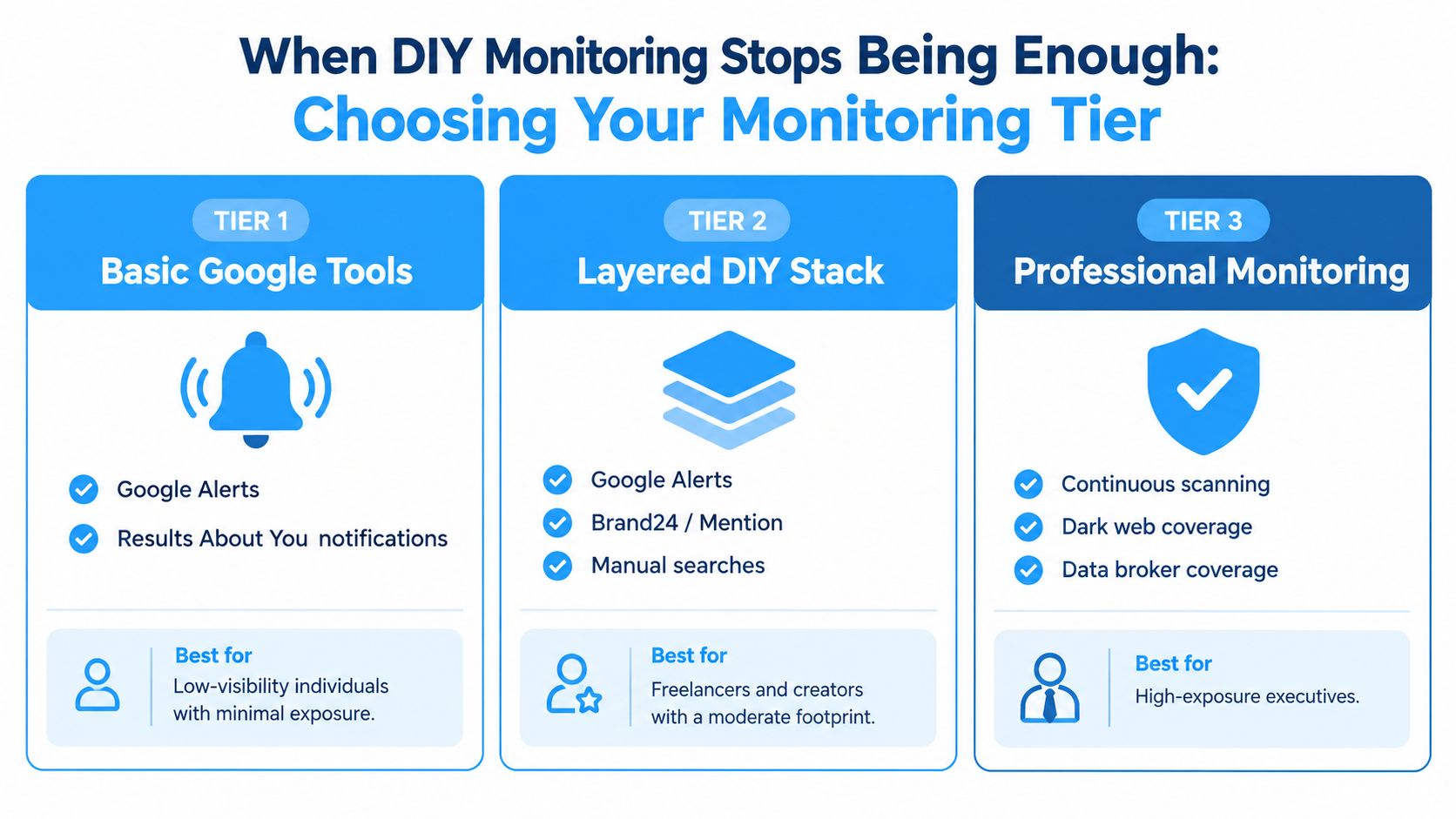
Tier one for low-visibility people
If your name has a small search footprint, Google's own tools plus scheduled manual checks usually do the job. Set up Results about you, search your full name and variants on a set cadence, and log what appears across standard results, images, and any profile pages you control.
This tier is for monitoring, not active reputation repair. It catches clear changes. It also misses quieter shifts, especially if unwanted results surface only for certain locations, devices, or audience-specific searches.
Tier two for founders, freelancers, and creators
Once your name affects sales calls, client trust, speaking opportunities, or inbound leads, casual checking stops being enough. The work usually expands into recurring audits across branded search, image search, local results, review surfaces, and name variations tied to your niche or city.
DIY can still work here, but the trade-off is time and consistency. The problem is rarely a lack of tools. It is that the audit gets skipped for six weeks, then a prospect, journalist, or event organizer sees the one result you have not reviewed.
At this stage, every finding needs a next action. Owned profiles get cleaned up. Harmless clutter stays on a watchlist. Negative but removable material gets documented and challenged. High-authority content you cannot remove becomes a suppression problem.
Tier three for executives and high-risk profiles
Outside help starts making sense when one result can create business, legal, or personal exposure. That includes review attacks, persistent third-party coverage, doxxing or privacy issues, impersonation, and dominant publisher pages that outrank everything you own.
The warning signs are usually clear:
- Persistent third-party coverage you cannot edit or influence directly
- Coordinated review attacks or repeated policy-violating reviews
- Legal or privacy exposure tied to personal information
- A dominant high-authority result that consistently outranks owned assets
- Cross-market visibility problems where results change by geography, language, or audience
At that point, the issue is no longer whether you can search your own name. It is whether you can keep auditing every surface, choose the right response for each result, and push action fast enough. If the answer is no, bring in support before the situation hardens into page-one history.
Turning Findings Into a Triage and Action Plan
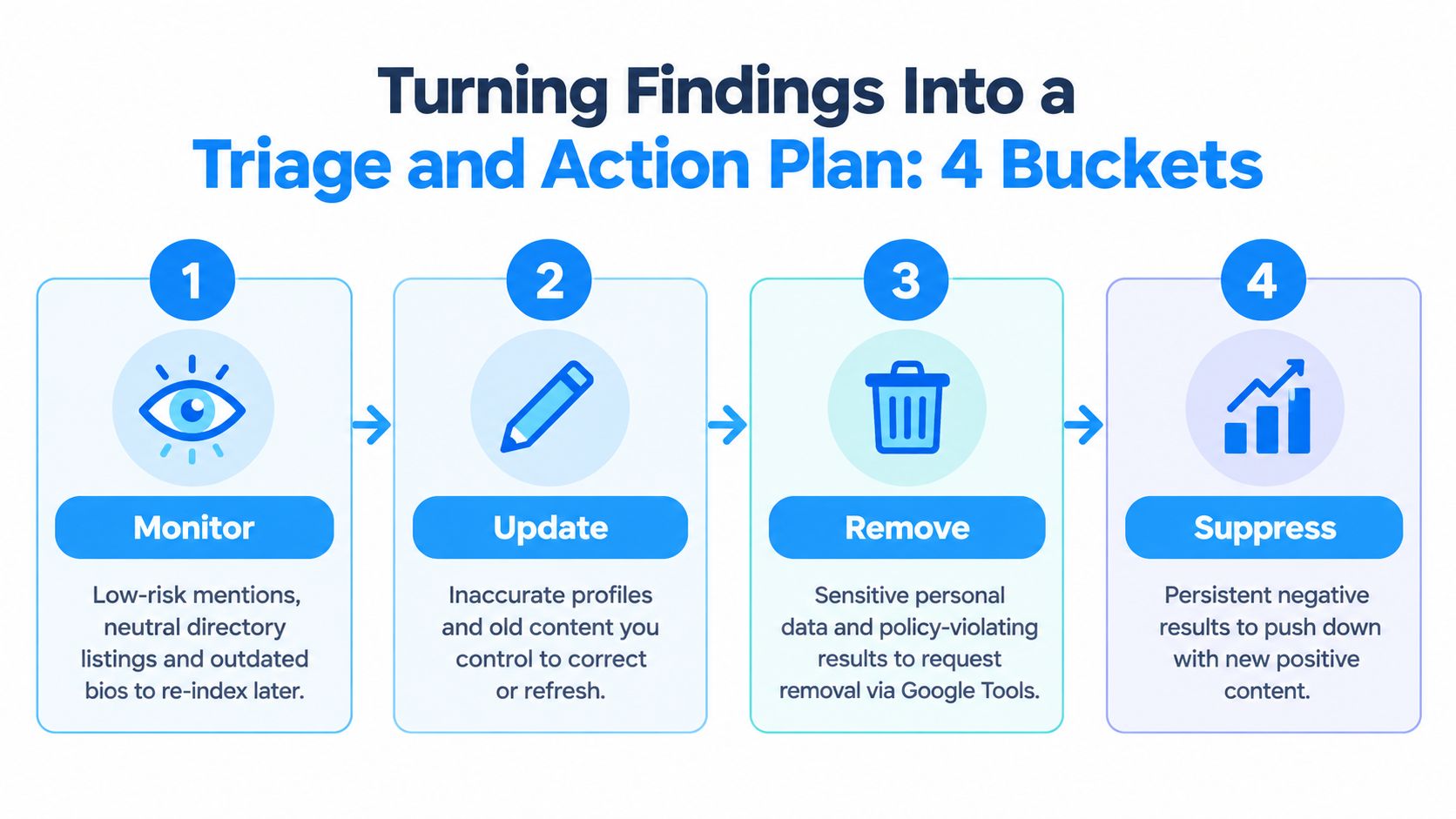
An audit without triage just creates anxiety. You need to convert what you found into buckets that tell you what to do next.
The four buckets I use are monitor, clean up, suppress, and escalate. Every result should land in one of them. If you can't assign an action tier, you probably haven't diagnosed the result clearly enough.
Monitor what is visible but not harmful
Some results don't justify intervention yet. Neutral directory listings, old event bios, and low-visibility mentions often belong here. They may be stale, but they aren't distorting perception enough to earn time right now.
Monitoring means keeping them on your spreadsheet, checking whether they rise, and noting whether they matter to a real audience. Don't waste suppression effort on harmless clutter.
Clean up what you already control
This bucket should be the fastest win. Fix your first-party surfaces first because they are the easiest to improve and the easiest for Google to trust when they stay current.
That usually includes:
- Owned profiles such as LinkedIn, speaker bios, author pages, and team pages
- Old accounts that still rank but no longer represent you
- Metadata problems like weak titles, stale descriptions, wrong employer names, or duplicate bios
- Removed or revised pages that need re-indexing or search cleanup
A lot of reputation drag comes from neglect, not crisis. Tightening what you control often improves the whole results page before you touch anything adversarial.
Suppress what can't be removed cleanly
Suppression is where ORM becomes strategic. If a negative or unhelpful result is lawful, indexed, and difficult to remove, your job is to make stronger assets outrank it.
That usually means building or refreshing assets with better authority, recency, and relevance. Think updated expert bios, thought-leadership pieces, media coverage, organization profiles, and social profiles with clearer name alignment.
What doesn't work is random content production with no SERP intent. Suppression only works when the asset is designed to compete for the exact branded query that's causing the problem.
If the bad result ranks for your full name plus profession, publish assets built for that same search behavior. Generic blogging won't solve a branded SERP problem.
Escalate what creates safety, legal, or regulatory risk
This bucket is for results that move beyond ordinary reputation work. Personal data exposure, impersonation, doxxing, policy-violating reviews, non-consensual imagery, and certain regulated privacy issues belong here.
The UK Information Commissioner's Office states that individuals have a right to request removal of a search result in qualifying circumstances, which gives search-result management a legal dimension in addition to platform workflows (ICO guidance on internet search results). When applicable, combine that route with search-provider requests and direct source remediation.
Use escalation when:
- Personal information is exposed
- A result may qualify for formal takedown review
- Platform policy violations are documented
- The issue affects safety, licensing, employment, or compliance
- The same harmful result keeps resurfacing after lighter fixes
A real self-search audit isn't something you finish once. It's something you repeat. Most professionals should run it quarterly. Higher-exposure profiles should check monthly, and anyone going through a major life or business event should run a fresh audit right after the change hits the web.
If your search results need more than a quick cleanup, TheBestReputation helps individuals and organizations audit what shows up, identify what can be cleaned up or suppressed, and build an action plan around the results that matter. It's a practical fit when you need more than a vanity check and want a structured reputation review tied to search visibility, removal options, and ongoing monitoring.
